Showing posts with label reviews. Show all posts

Tuesday, February 14, 2012

Mini-Review: Wilco 737 PIC Evolution

I have a confession to make: I honestly hate doing reviews of bad or mediocre products.  It is no fun.  I know many developers put a lot of time, money, and effort into producing their products.  I really do not enjoy trashing things that people have poured their heart and soul into.  I want to like everybody's products - I really do.  However, when a particular product leaves me less than satisfied, I have to call it as I see it.

Wilco Publishing has something of a mixed track record in flight simulator enthusiast circles.  Some of their products have been above average.  Many others, however, too often come up a bit short.  Unfortunately, their new 737 PIC Evolution falls into the latter camp.  To be fair - there are aspects of it that are quite good.  However, it also has a number of shortcomings that are downright maddening.  When the original 737 PIC was released several years ago, it was well-received as the only game in town for flying a quasi-realistic 737.  Unfortunately for Wilco, PMDG and iFly have both since appeared on the scene and upped the ante with their 737 products.  Wilco needed a home run to stay in the game with the 737 PIC Evolution, but unfortunately, they just aren't there yet.

OK, so to be fair, it's not an apples-to-apples comparison.  The 737 PIC Evolution models the 737 Classic series (737-300/400/500), while the PMDG NGX and iFly 737 NG both model the newer 737 NG series (737-600/700/800/900).  Still, I have to think that if PMDG or iFly deigned to take a crack at producing a 737 Classic, they would both produce something that tops the 737 PIC Evolution.

Before I get into why I find the 737 PIC Evolution distasteful, let's start out with a view of the exterior model.  This is a repaint of an Alaska Airlines 737-400.  Looks nice enough:


Here are some shots of the 3D VC.  I'll give Wilco some credit here for actually rendering the clickable buttons in 3D on the 737 PIC Evolution, rather than relying on flat textures as they did in the old 737 PIC:


By day, it's actually a rather nice virtual cockpit:


Although not shown here, you can optionally switch out the digital instruments in the middle of the panel with old steam-style analog versions.


Here is a view of the main 2D cockpit panel, sized adequately for widescreen monitors.  Some have described it as a bit unrealistic looking.  It's not horrible, at least...


Here is the 2D overhead panel:


Here is the INS panel:


Here are the radios, transponder, and TCAS controls in a 2D panel:


This little 2D panel allows you to change the range on the EHSI.  It is also included in the previous 2D panel above:


Here is our good friend, the FMS:


This 2D panel controls throttles, brakes, flaps, and spoilers:


And here is an action shot of the 737-400 taking off from Portland International Airport (KPDX), eventually bound for Gowen Field in Boise, Idaho (KBOI):


Cruising past Mt. Hood:


And now, we get to the aspects of the 737 PIC Evolution that really annoy me.  (This is with the v1.1 update, too.)  The taxi and turnoff lights are turned on here, but you sure wouldn't notice by the lack of reflection on the ground:


Only when you turn on the landing lights can you see any sort of reflection on the ground:


Next, the 3D VC is entirely too dark without any lights on.  Even the glass displays are abnormally dim.  Turning on the lights in the cockpit turns on the lights for the entire cabin - is this normal?  It seems to me that there should be a way to just turn on the lights that backlight the key instruments on the flight panel, but I confess I am not an expert 737 Classic driver here, so maybe this is expected.

However, what isn't expected is how strange and funky some of the night textures look when they are lit up.  The lighting just looks very unnatural - it's way off somehow:


I guess these things are mostly aesthetic, and do not affect the operation of the aircraft.  And arguably, I'm terribly spoiled by the attention to detail on the PMDG 737 NGX.  Still, you would think Wilco could have done better than this on the 737 PIC Evolution.  The whole thing just seems like they were in a big rush to get the product out the door and cash in, without paying attention to all the little details that make a product truly special.  If I'm given a choice between this and the NGX, I'm going with the NGX every single time.

So, to summarize:

Pros:

- The 737 PIC Evolution flies reasonably well.  Most important functions seem to work correctly.
- Winglets are now modeled on the 737-300 series.
- No problems with crashes to desktop or similar fatal bugs.

Cons:

- The lighting bugs are really glaring, and detract from the overall enjoyment of the aircraft.
- Not as realistic as other 737 products.

Conclusion:

I went back and forth over how to rate this product - in particular, whether it should merit the very first Pretend Flyer "Recommended" rating.  The Wilco 737 PIC Evolution is functional, and generally seems to be an improvement over the original 737 PIC.  However, the 737 PIC Evolution is uninspiring, and has some substantial flaws.  It's difficult to say that this one will see a lot of time in my virtual skies when there are other, similar products that are just better.

The bottom line is that, ultimately, to whom would I recommend this product?  I honestly cannot come up with a great answer to this question.  If you are just looking for a decent 737 to add to your virtual fleet, and you do not really care whether it is a newer 737 NG versus a 737 Classic, then the iFly 737 NG is a better choice at almost the exact same price point.  If you want the ultimate in realism, then spend the extra cash on the PMDG 737 NGX.  But if you absolutely must have a 737 Classic in your fleet, then I guess the Wilco 737 PIC Evolution is your only viable choice at the moment.  However, this is a pretty tepid recommendation, given how crowded the marketplace is with various 737 products.  There just does not exist a really good reason to purchase the Wilco 737 PIC Evolution otherwise.  I suspect the number of people who insist on owning a 737 Classic is probably a very small fraction of the overall market.

Rating - Recommended (sort of)

Thursday, August 25, 2011

Mini-Review: PMDG 737 NGX

Earlier this month, PMDG released their long-awaited 737 NGX product.  The initial product release consists of the 737-800 and 737-900 models, with other 737 variants forthcoming as optional expansion packs.  PMDG's servers were overwhelmed with enthusiastic flight simmers around the globe picking up their copies of the plane - and also a rogue denial-of-service attack apparently originating in China.  I decided to wait about a week and let the initial excitement die down just a touch.  I finally picked up the NGX about two weeks ago, and have spent a fair amount of time with it since.

Here we see the PMDG NGX 737-800 model in all her glory, in an American Airlines repaint:


For our test flight during this review, we will be doing a quick charter run from Miami International Airport (KMIA) to Jose Marti International Airport (MUHA) in Havana, Cuba.  The above screenshot was taken on the initial climbout over south Florida.  Flight time will be about 45 minutes, which is just about enough time to do a quick rundown of all the features of the NGX.

As with PMDG's previous flagship level products, the NGX comes with a full set of 2D panels.  Here is the main 2D panel for the captain's seat:

Here is another 2D panel for the dome lighting directly overhead:


Here is another 2D panel for the captain's FMS:


Here is a 2D panel for the center pedestal, controlling the radios, transponder, and TCAS:


Here is another small 2D panel controlling the fire suppression controls:


And another 2D panel for the overhead switches, including the lights, pressurization, and hydraulics:


Here is another 2D panel for the INS:


And here is a smaller 2D panel for just the overhead lights - this is a smaller version of the overhead panel, designed to not obstruct the pilot's view while flying:


Now here are a couple of screenshots of the 3D virtual cockpit, which is my preferred way to fly.  The Florida Keys loom somewhere down below:


PMDG has spared almost no detail when modeling the NGX.  Every switch makes a click, and with few exceptions, actually does something.  Boeing supposedly gave PMDG unprecedented access to the schematics and design documents of the real 737 NG series, and PMDG used this information to model every last bit of a 737 NG in the NGX.  I understand Boeing is providing PMDG with similar access to the 777 for their forthcoming 777 product, as well.

Flying the NGX is a bit like peeling an onion.  (Then again, I think this is probably true of every PMDG product I own!)  Veterans of the old PMDG 737 series (FS9-only) or the iFly 737 NG will have no trouble getting the NGX up in the air quickly - probably without even reading the tutorial.  To a lesser extent, any flight sim veteran should be able to get the NGX airborne with only a modest learning curve.

However, there is a gotcha: systems that are not modeled in other 737 NG products are modeled on the NGX.  In gory detail.  For veterans of other 737 NG products, this will occasionally lead to some unexpected issue popping up, due to the fact that the NGX actually models a particular system that others do not.  One example: on my maiden flight of the NGX, I simmed an American Airlines flight from KDFW to KAUS.  I ran with about 1/3 fuel load.  About midway through the flight, I get an alert that the hydraulics system is overheating!  Never seen that one before.  Well, it turns out that the real 737 NG uses fuel in the center tank as a heat exchanger for the electro-hydraulics pumps.  If you don't have at least around 2,000 lbs. of fuel in the center tank, there is no liquid there to collect the excess heat from the hydraulics pumps, and they overheat.  Good to know.  This is the kind of detail you can expect to see in the NGX.

Similar to the PMDG MD-11, there are other bits of eye candy modeled as well.  Things like the pushback sequence, and ground connections for the MD-11.  You can even chock the wheels when you are parked at the gate!

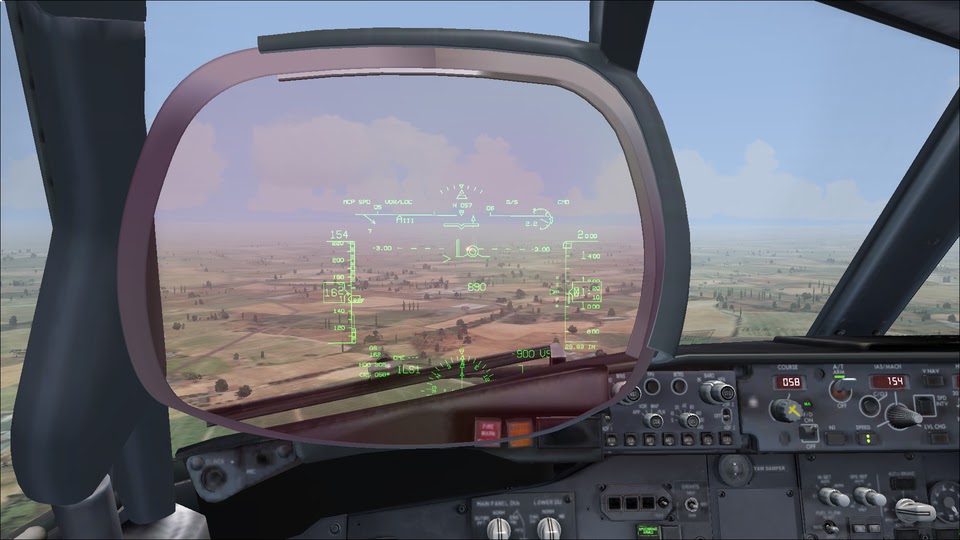
Now I would be remiss if I did not mention one of my most favorite features in the NGX: the Heads-Up Guidance System, or HUGS.  Sure, PMDG is not the first developer to introduce a HUGS in a product - the Wilco/feelThere ERJv2 models a HUGS in the Embraer E-175 and E-195, for example.  However, PMDG probably has the best implementation of a HUGS I have ever seen.  Notice how the color of the light changes when you peer through the HUGS to the outside windscreen, for example:


The HUGS is a wonderful innovation for pilots, as it provides them all the instrumentation information they need without having to look away from the window.  Pilots can integrate the instrument data along with the visual external cues to increase situational awareness - for example, if the airspeed is too high or too low, the pilot can adjust the throttles accordingly without even taking his eyes off the approach.


Another nice feature of the HUGS in real life is that you can see the data being presented at any viewing angle.  Notice what happens in the HUGS in the following screenshots when I pan to the right in the 3D virtual cockpit:


Amazing!  This is the level of detail you can expect with the NGX.  Using the HUGS makes a smooth landing in normal conditions a snap almost every time.  You never have to pan away (or zoom back far enough) to monitor the instruments while landing.

Here are a few other pictures of the exterior model as we fly over the Florida Keys:


Key West is down below: NAS Key West (KNQX) on the right, and the smallish Key West International (really?) Airport (KEYW) on the left.  With a runway only 4800' long, it's hard to believe that AirTran and Delta actually run Boeing 737-700s (severely weight restricted) on scheduled service out of there to Orlando, Tampa, and Atlanta.  Remind me to try that flight when PMDG releases the 737-600/737-700 expansion models for the NGX:


Touching down in Havana.  Welcome to Cuba!


Another nifty feature of the NGX, not shown here, is the ability to dynamically configure the airplane's fuel, payload, and features through a special menu on the NGX.  If your pet airline uses the Collins instrument panel instead of the Honeywell instrument panel, changing it is easily done in just a few mouse clicks!  You can also save configurations for a particular repaint.  Some of the repaints from PMDG even come with configurations that accurately reflect how that particular airline configures its 737 NG.  Very cool.

So you may be asking, what are the downsides to the NGX?  Not many.  Here are a few I can think of:

  • I have experienced a few intermittent freezes and crashes.  However, this may have been a product of having my graphics sliders set too high on the new flight sim rig I am testing out.  I need to run some further test flights with more realistic settings to gauge whether or not this is a big problem.
  • Performance did seem fairly reasonable on both my laptop and my main flight sim rig.  It may tax some older systems or video cards much more than some other add-ons.  PMDG has spent a great deal of time optimizing the NGX, and there is definitely a balance to strike between having lots of detail versus reasonable performance.  I think PMDG did a smashing job of finding the right balance with the NGX - for most of us with decent systems and video cards, we will have our cake and eat it, too.
  • Price is US $70 right now, for a limited time only.  It will jump to US $75 when the first expansion model (the 737-600/737-700 series) comes out.  This seems on the high side, but is actually a tremendous value for the features and level of detail that you get.  Plus, you get to control how much you want to spend: if you want all the variants, you could potentially blow as much as US $150 or more.  (Thankfully, not all at once!)  If you don't care about those and just want to fly a 737 NG of some sort, then you'll get by just fine with the base model.
  • Complexity will put off some novices.  I love a certain amount of complexity myself, but if you don't, then you might consider giving the iFly 737 NG a go instead.
In short: PMDG will no doubt clean up on all the 2011 Flight Sim Product of the Year awards.  It won't even be close.  Which is really too bad in a way, because there are also a lot of other interesting aircraft coming down the pipe in the not-too-distant future.  However, PMDG has definitely earned it with the NGX.  Serious flight simmers will definitely want to add this one to their collection.  The NGX is fun to fly, and will reward extensive study of her features for a long time to come.  Don't miss it!

Rating: *****

Sunday, May 22, 2011

Mini-Review: iFly Jets 737 NG (FSX)

While the forthcoming PMDG 737 NGX product seems to be grabbing most of the hearts and minds of the flight sim community, another competing project has quietly emerged on the scene.  Developed by a relatively new outfit known as iFly Jets and distributed by Flight1, the iFly 737 NG series, which was originally released for FS9 last year, has recently been enhanced and updated for FSX.  The FSX version finally rolled out last week, and I felt it would be worth taking a look at - especially since PMDG seems to be in no big hurry to release the 737 NGX just yet.  (Yes, I know, they have very good reasons, and we won't get sidetracked with that here.)

The iFly Jets 737 NG includes all of the following variants of the 737: -600, -700, -800, -900, BBJ, BBJ2, BBJ3.  Here is a shot of the external model of the 737-900 with winglets in Alaska Airlines livery:


For this review, we will be simulating a short delivery flight from the Boeing 737 factory at KRNT to one of Alaska Airlines' hubs at KPDX.  Here is a shot of the main 2D panel from the Captain's seat:


Here are various other 2D panels.  The FMC:


The flight yoke:


The upper center console, with dual FMCs, throttles, and the other goodies one would normally expect to find here:


Here is the main overhead panel, including the lights:


Here is the rest of the overhead panel, including the IRS:


Here is the radio stack in the lower center console:


And here is the main 2D panel from the First Officer's seat:


The iFly Jets 737 NG also comes with a very nice 3D virtual cockpit:


One thing worth pointing out here is that the 737 NG series is one of the most configurable aircraft series around.  It seems every carrier which operates the type has their own unique combination of options for their own 737 NGs.  Examples include winglets vs. no winglets, eyebrow windows vs. none, old MCS vs. new MCS, CRT vs. LCD screens, EFIS/Map displays vs. PFD/ND displays, and so on. The really cool thing is that the iFly Jets 737 NG allows you to configure these options on a per-livery basis.  You can go investigate the cockpit pictures of Delta's 737-800s at sites like Airliners.net, and configure your Delta repaint with many of the same options.  This adds a degree of realism that is very nice - as opposed to add-ons like the Captain Sim 757, which model only one fixed set of options for the 757.

Here are a couple of examples of how you can vary the options.  The first picture resembles a Southwest Airlines example, which recently switched from EFIS/Map to PFD/ND in all of its 737-700s.  Note the newer-style MCP as well:


And here is an example from a United (Continental) 737-800, which still uses the EFIS/Map style displays, presumably for commonality with their older 737 Classics:


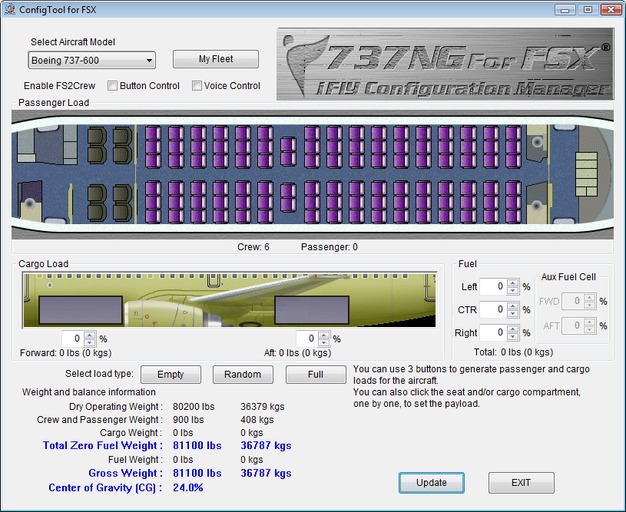
All of these options are managed on a per-livery basis through the iFly 737 NG Fleet Manager, which is part of the iFly 737 NG Configuration Manager.  The Configuration Manager does the usual job of managing payload and fuel for your next flight, as with many other similar utilities.  The Fleet Manager tool within actually helps you manage your repaints and configurable options.  It is somewhat crude - you still have to unzip your repaint into the appropriate subdirectory under SimObjects\Aircraft first.  Once you do this, the Fleet Manager can find the directory you have created, and walk you through the process of setting all the options for that repaint, and update the Aircraft.cfg file for you.  Here is a screenshot of the Configuration Manager.  Click on the "My Fleet" button to access the Fleet Manager here:


And here is a slideshow of various images of the iFly 737 NG in action, on our delivery flight from KRNT to KPDX:


The iFly 737 NG series is fun to fly, and generally works as advertised.  I ran into very few problems with crashes that could not be attributed to other external factors, such as running out of memory.  (Due to a lightning storm taking out my main FSX rig, I had to install and fly the iFly Jets 737 NG on my laptop.  It actually worked okay.)  Make sure you are not low on disk space, in case your machine needs to swap pages to disk.  When I ran low on disk space on my laptop, the iFly 737 NG started behaving in some rather peculiar ways.  Freeing up disk space made it a lot happier.  Users with powerful systems will not likely run into this issue.

Of course, this review would be incomplete without discussing some limitations/drawbacks of the iFly 737 NG series:

  • One notable omission in the list of 737 NG variants modeled by the iFly 737 NG is the 737-900ER.  While externally almost identical to the 737-900, the main point of frustration for me is the inability to "convert" a 737-900 to a 737-900ER by adding the auxiliary fuel tanks.  Yes, I'm aware there are a few other differences between the 737-900 and 737-900ER - such as the extra set of doors, allowing it to be certified for more passengers - but as I see it, the missing aux fuel tanks are the only thing affecting the operation of the plane itself, by limiting its range.  I would love to see a 737-900ER modeled by the iFly 737 NG as well, perhaps in a future update of the product.  It seems it wouldn't be terribly difficult to add this variant, considering that they already do a BBJ3, which is based on the 737-900ER.
  • Weather radar is not modeled on the iFly 737 NG.  Then again, PMDG won't be modeling it in their 737 NGX product, either.  As a workaround, there is a procedure posted in the iFly forums for adding the third-party Reality XP Weather Radar into the iFly 737 NG panel.
  • The EGPWS Peaks display is apparently not modeled on the iFly 737 NG.  Not a huge issue, as it is an optional feature in the real-life NG.
  • Repaints from the FS9 version of the iFly 737 NG apparently are not 100% compatible with the FSX version.  I tried installing an FS9 livery in the FSX version, and it looked terrible.  Not a major issue, but be warned if you download any repaints from AVSIM.
  • The iFly Jets 737 NG series seems a little framerate heavy - nothing severe, but probably roughly in the neighborhood of some of the Captain Sim products.  You may want to dial back your detail settings a little if you are working on a lesser machine.
Conclusion:

The iFly 737 NG for FSX is one of those very unfortunate victims of timing.  In and of itself, it is a very nice simulation of the 737 NG series - an aircraft that has been long overdue for a proper treatment on FSX.  If iFly had chosen to do almost any other aircraft instead, everyone would be raving about how nice a product this really is.  However, because of the looming release of the PMDG 737 NGX within the next few months (presumably), it will be difficult for the iFly 737 NG to get a fair shake. It remains to be seen how much the PMDG 737 NGX will actually live up to expectations, but given the details that the PMDG developers have let slip so far, it is shaping up to be the Cadillac of 737 NG simulations.  I liken the iFly 737 NG to something more along the lines of a Toyota Corolla - a solid, dependable, and less expensive simulation of the 737 NG series.  It may lack some of the features and modeling that will make the PMDG version special, but it is still a very, very good simulation of the 737 NG series.  I like the iFly 737 NG, and I wish the iFly team great success with the product.  It is a solid first release from a relatively new team on the payware scene.  Hopefully, iFly will have better luck in the future with choosing projects that will differentiate them from their competitors in the marketplace.  I would really love to see iFly do a Boeing 717, in particular - I think they would do a great job with it.

If you are looking for a decent, relatively inexpensive simulation of the 737 NG, and you don't want to wait for the PMDG 737 NGX, then you certainly can't go wrong with the iFly 737 NG series.  It works well, and it is actually fun to fly.  Subject to the above limitations, I can't really say anything bad about it.

Rating: ****